Does your website need a redesign or a rebuild?
A practical way to choose between focused improvements, a new design, and a platform move without replacing what already works.
 By Mubarak Bello · No-Code DevUpdated
 Choose the smallest change that solves the real problem
My starting point is the smallest change that can solve the actual problem. Sometimes that is a clearer product page. Sometimes the whole publishing structure needs work. Before recommending a redesign or rebuild, I want to separate the story visitors see from the system your team uses to maintain it. Those two problems can need very different answers.
Change the experience; keep the operations that work
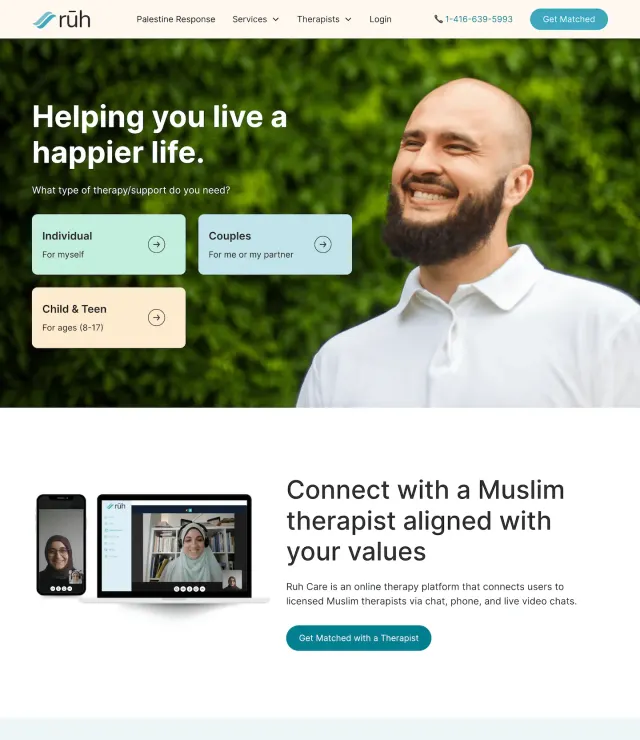
Ruhcare needed more control over its public experience and therapist presentation. The delivered solution kept its existing directory operations and connected them to a custom Webflow front end. I would use that project to challenge an all-or-nothing rebuild brief: first identify the part that limits the business, then decide which surrounding systems still earn their place.
Divide your review into “visitor experience,” “publishing,” and “connected operations.” Name a concrete failure in each column before choosing a platform.
Describe a failure someone can observe
“The website feels old” is a starting opinion. “Visitors cannot tell which product is for them” gives you something to investigate. So does “publishing a case study requires an engineer” or “the enquiry form loses the service someone selected.” Collect examples from sales conversations, support requests, team workflows, and available analytics. Avoid assuming that a lower enquiry count proves the design is wrong: changes in traffic quality, campaigns, or the offer may also matter. Write the problem before choosing the remedy.
Choose focused improvements when the foundation works
A targeted update makes sense when the platform, templates, and publishing workflow still serve the team. You might clarify one product page, simplify navigation, fix mobile spacing, or connect a form properly. Agree which page or journey you will change and what evidence would make that change useful. For example, testing whether visitors can identify the next step answers a clearer question than asking whether the new layout looks modern. Keep a record of the original state so future decisions have context.
Choose a redesign when the story or experience has changed
A redesign is worth considering when the business has outgrown its messaging, visual identity, or page structure, but the underlying platform remains suitable. Perhaps a single-product site now needs to explain several offers, or a founder-led business needs stronger evidence for larger buyers. You can retain valuable content and working integrations while changing the experience around them. Be explicit about whether the existing implementation can support the new design. Sometimes a redesign also requires rebuilding templates, without requiring a platform migration.
Choose a rebuild when the structure limits the work
A rebuild becomes more reasonable when the existing system repeatedly prevents necessary changes. Warning signs include inconsistent templates, brittle custom code, unclear content relationships, or a publishing process that depends on one person’s undocumented knowledge. These are reasons to inspect the implementation, not automatic proof that Webflow is the answer. Review the recurring tasks, integrations, permissions, and content volume your next system must support. The right platform is the one that fits those requirements and the people who will operate it.
Preserve the parts that already earn their place
Before replacing anything, record useful pages, important URLs, downloads, integrations, and customer journeys. Include campaign landing pages that are absent from the main menu. Separate content worth keeping from content that needs a new home or a rewrite. A page receiving relevant visits or answering a recurring sales question may still have value even if its design is dated. Use that inventory to decide what the new site must carry forward, and assign someone to approve anything proposed for removal.
Treat changed URLs as a launch responsibility
If URLs change, Google recommends preparing a mapping from old pages to their new counterparts and configuring redirects. Send visitors to the relevant replacement, rather than treating the homepage as a destination for everything. Update internal links and the sitemap, then check the live behavior. Google also advises expecting possible ranking fluctuations during a move. A careful migration plan reduces avoidable mistakes; it cannot promise unchanged rankings or an immediate uplift. Keep the redirect map as a deliverable your team can review.
Separate the launch decision from the design review
A design can be approved while the website is still not ready to receive enquiries. Before switching, test forms and their destinations, booking links, content editing, mobile layouts, and important old URLs. Confirm who can change domain settings and who can respond if something fails. Keep a copy of the existing site and agree a recovery approach. Where practical, stage major changes rather than changing the domain, platform, content, and visual system at once; Google’s migration guidance recommends limiting simultaneous changes.
Use this decision checklist
- The offer is clear, publishing works, and only a few journeys fail: start with focused improvements.
- The offer or brand has changed, but the platform still fits: investigate a redesign.
- Publishing and maintenance repeatedly fail because of the underlying structure: assess a rebuild.
- A platform move changes URLs or content: include migration and live verification in the scope.
- The problem is still unclear: begin with an audit and a prioritized plan.
Make the recommendation before the commitment
You do not need to arrive with the answer. Bring the current site, the tasks that feel difficult, and the business changes it needs to support. A useful first conversation should identify what deserves to stay as well as what needs work. No-Code Dev can help turn that evidence into a focused improvement plan or a scoped redesign and migration, with clear responsibilities for the content and the launch.
Sources & further reading
Working through this on your site?
Bring your questions. We’ll help you find a useful next step.